- Posted by Paksu
- Posted in 3 Column Themplate .
Sometimes fancy blog templates look great, but one of the problems I’ve found is that a lot of fee blog templates have elements I like - and elements I would prefer to change. A lot of the time I want something that works without a lot of tinkering with the code. Ultimately I want a basic blog template with easily changeable colours and that isn’t limited to a narrow choice of topics. Frequently I find myself using the Minima template from Blogger. One of the limitations of the Minima Blogger template is it’s 2 column design. I search around quite a bit but couldn’t find a 3 column version of Minima for Blogger that I was happy with. Actually I found very little in the way of 3 column versions of Minima. So I decided to invest the time to build a solid 3 column version of Blogger’s Minima template (originally by Douglas Bowman of stopdesign.com) and make it available for download. I call the template Minibox because I did decide to add some extra outlines to the sidebar widgets and the main blog content.
Blog Template Features:
- XML template for new blogger
- Change colors from within blogger
- Compatible with Blogger drag-and-drop layout editor
- Ad-free - No forced ads
- AdSense compatible - Put your ownAdSense ads on your blog
- Same variable and CSS section names as Minima so if you’re familiar with the Minima CSS and Blogger XML code it will be easy to read and modify the Minibox template code.
Installation Tips:
- Backup your current template. Blogger let’s you download your current template as a backup, or you can cut and paste the template into a text file.
- The method I’ve been using is to open the new template in a text editor and copy and paste it overtop of your existing blogger template code (Go to ‘Edit HTML’ in the ‘Layout’ tab of your Blogger customization/administration page). Do NOT expand widgets before pasting the new template code. My template file does not include the expanded widget code (no changes were necessary).
- Also, if you have already have custom widgets on your blog (maybe you created a link list, or added a picture in your sidebar), you need to take some extra steps to avoid wiping them out with the new template. I will post another article on how to do this if someone needs some help. In the meantime leave a comment if you have any questions or run into any installation problems and I will try to respond as quickly as possible.
- If you’re blog is relatively new or you don’t mind reconfiguring your widgets you can just upload the XML file (Go to ‘Edit HTML’ in the ‘Layout’ tab of your Blogger customization/administration page) after you download it from below.
0 comment | leave yours ?


- Posted by Paksu
- Posted in Free Website Template .

0 comment | leave yours ?
- Posted by Paksu
- Posted in Free Blog Template .

Another great blogger template is ready to be downloaded. This one is an port of the visionary wordpress template made by Justin Tadlock. Besides being ultra cool for magazine type of blogs it features animated sidebar tabs
0 comment | leave yours ?


- Posted by Paksu
- Posted in Free Blog Template .

We love this template, and it seems many Bloggers do as well. The header image was taken from a photograph of an Agapanthus stalk in our front garden
0 comment | leave yours ?

- Posted by Paksu
- Posted in Computer And Internet .

Shine-on is 3 columns blogger templates, this templates I crafted with some stripe effect on the header and some green gradient on each post, I hope you'll like this templates.
1 comment | leave yours ?



- Posted by Paksu
- Posted in Free Blog Template .

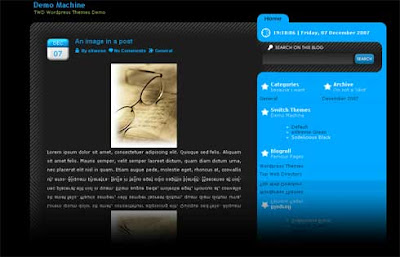
Black Tech is another nice Wordpress template converted by me for Blogger. It is a 3 column template which are very rare for blogger
Download the template here
0 comment | leave yours ?

- Posted by Paksu
- Posted in Food template .
Title: Chocolate Fudge
Author: carlgalloway
Platform: Blogger, Blogspot
Filetype: xml
Download Here
1 comment | leave yours ?
- Posted by Paksu
- Posted in Blogger Template (The Full Version) .
3 columns, content on the middle

3 columns, content on right

3 columns, content on left

2 Columns, Content on left

2 columns, content on right

This is originally a wordpress theme created by nDesign Studio and converted to blogger template by Magznetwork. Below you can download all this template in one single zipped file, but if you want to download the template one by one, you can do it here on the original template page.
To make sure everything works fine, please read carefully the instructions below
INSTALLATION INSTRUCTION
- Download and extract the zip file.
- Login to your GooglePages and upload all of the images under /images folder
- Edit the XML file and replace http://YOURGOOGLEPAGES.googlepages.com with your Google account.
- Login to your Blogger Dashboard
- Go to Layout > Edit HTML
- Upload XML Template file (DO NOT copy and paste the code directly to template editor box)
- PLEASE DO NOT PREVIEW YOUR BLOG. Go to Layout > Page Element
- Edit “Top Menu” widget. Add at least one link, for example you can make a link to your blog homepage with “Home” anchor text
- Edit “Archives” widget. Chose “Flat List” Style and “MM YY” Date Format style, for example “February 2008″
- Edit “Recent Posts” widget. Change Feed URL to http://YOURBLOGNAME.blogspot.com/feeds/posts/default
- Edit “Recent Comments” widget. Change Feed URL to http://YOURBLOGNAME.blogspot.com/feeds/comments/default
- Go to Settings > Formatting, choose Timestamp style: “Wednesday, Januari 30, 2008″
- Finish. Preview your blog to see the result.
Download the package here

Downloaded a total of 107 times
0 comment | leave yours ?
